
Step 1: Choose Your Platform
UNI Invoice is available on Windows, macOS, Android, and iOS. Refer to the download table above and select the version that matches your device and operating system.
Download the UNI Invoice app for your preferred platform and get started with smart, secure, and professional invoicing in minutes.
UNI Invoice is available on Windows, macOS, Android, and iOS. Refer to the download table above and select the version that matches your device and operating system.
Click on the Download or Get App button. For desktop versions, the installer file will begin downloading immediately. For mobile devices, you will be redirected to the official app store.
After clicking the download button, Google Drive may show a warning stating that the file is too large to scan for viruses. This is a normal message for executable (.exe) files.
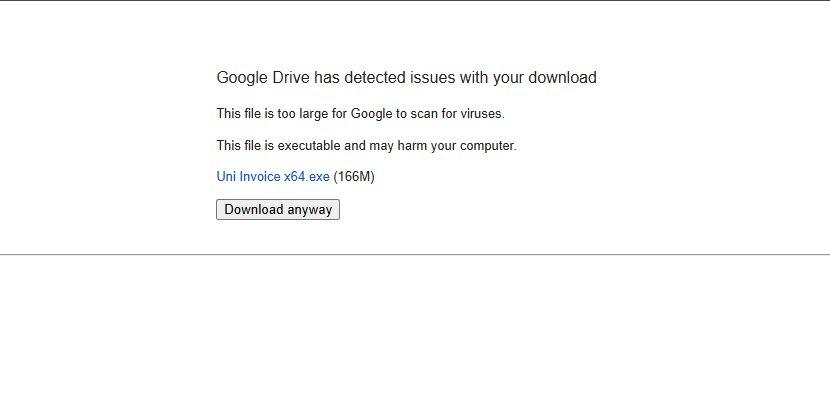
Click on “Download anyway” to continue.
Once the download is complete, open your Downloads folder and double-click on the file named UNI Invoice x64.exe (or x32 depending on your system).
Windows may display a security screen with the message “Windows protected your PC”. This happens when an application is new and not yet recognized by Microsoft.
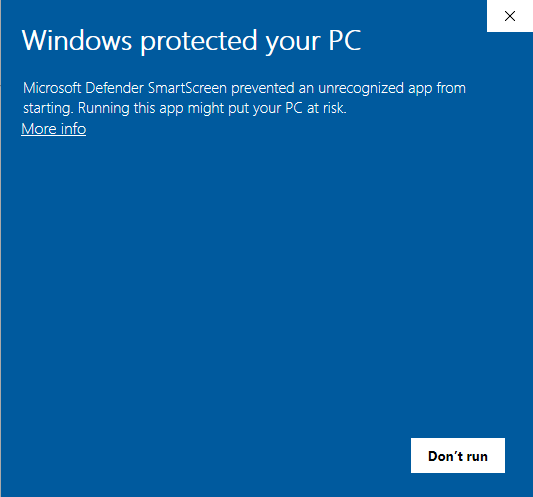
Click on “More info” to reveal additional options.
After clicking “More info”, you will see the option “Run anyway”. Click it to proceed with the installation.
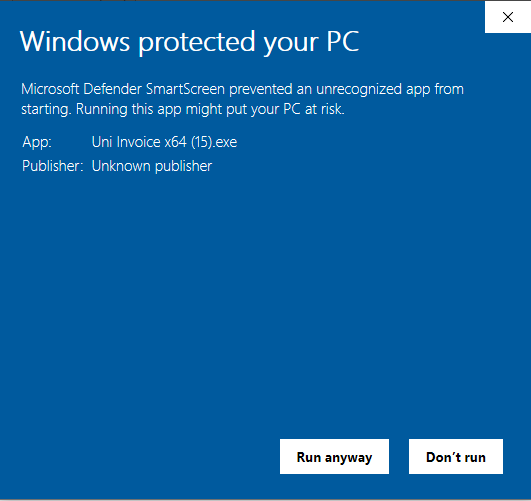
Follow the on-screen setup instructions. Once installation is complete, UNI Invoice will launch automatically or can be opened from the Desktop or Start Menu.
Security Note: UNI Invoice is safe to install. These warnings appear because the application is downloaded directly from our official source and is not yet digitally signed with Microsoft SmartScreen certification.
After opening UNI Invoice, sign in with your existing account or create a new one to start generating invoices, managing payments, and tracking your business finances efficiently.
If you face any issues during download or installation, visit our Help Center or contact our support team for quick assistance.